Connect Mountainhead and ask Claude to retrieve public disclosures with their source links: what Congress reported, which insiders bought shares, or how a manager’s quarterly holdings changed. Setup starts with one URL and a browser sign-in.
Mountainhead is our product. This guide covers the Claude app on the web, on desktop and on mobile. If you work in Claude Code or Cursor, follow the developer setup guide instead.
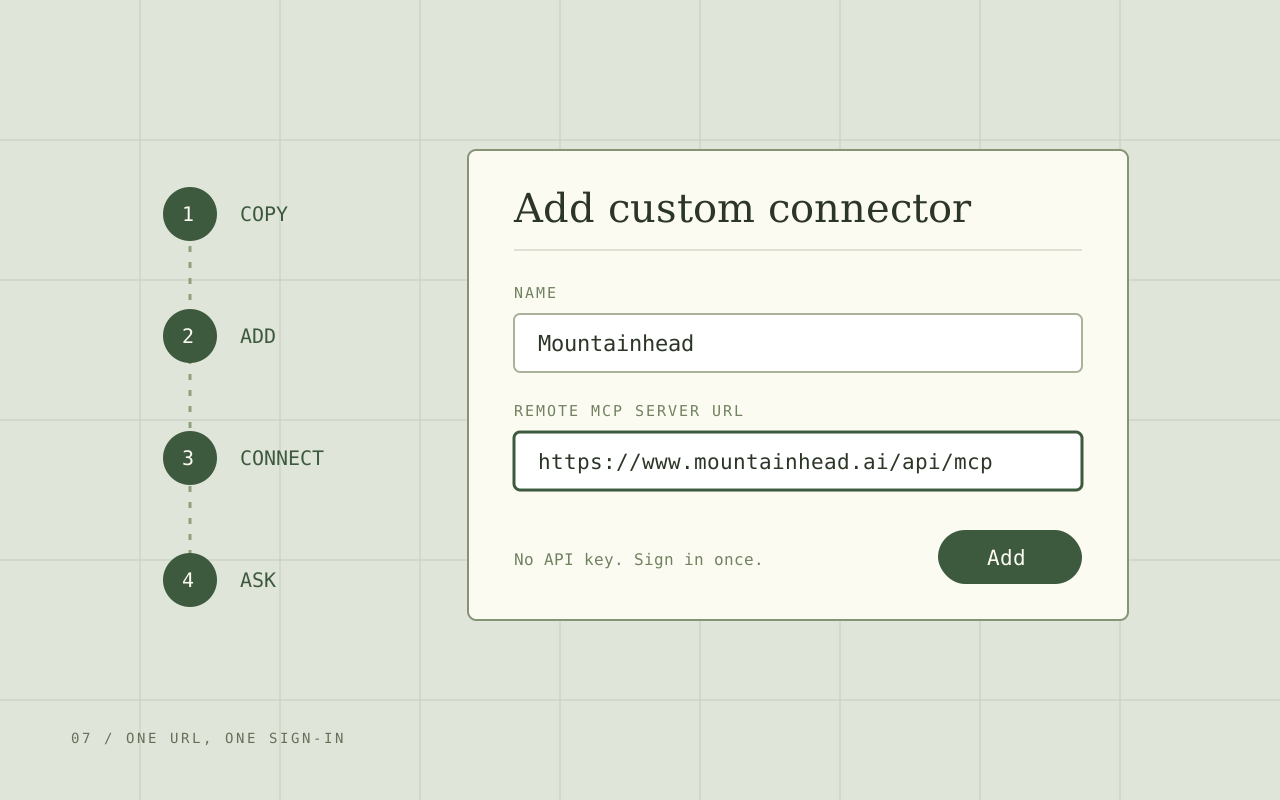
Step 1: Copy the server URL
https://www.mountainhead.ai/api/mcp Keep the www. Using the canonical address avoids a redirect during the connection handshake.
Step 2: Add a custom connector in Claude
Open Customize > Connectors in Claude, click +, then choose Add custom connector. Name it Mountainhead, paste the URL and click Add. Leave the optional OAuth client ID and secret fields empty: Mountainhead handles registration automatically.
On a Team or Enterprise plan, an Owner adds the connector once under Organization settings > Connectors. Members then find Mountainhead in their own Connectors list and skip to the next step.
Step 3: Connect and approve access
Click Connect. Claude opens Mountainhead’s sign-in page. Sign in or create a free account, read the access request and approve it. Claude keeps the connection, so you do this once rather than in every chat.
This is a standard OAuth sign-in. Your Mountainhead password never passes through Claude, and you can revoke the connection from your Mountainhead account at any time.
Step 4: Switch it on and ask
Start a chat, click +, open Connectors and switch Mountainhead on. Review any tool-permission prompt Claude shows; it can remember the permissions you allow.
Try the daily brief below. A working connection returns a Mountainhead tool result that Claude can summarize. If it answers from general knowledge without using Mountainhead, ask it to use the connector explicitly and check that the toggle is on.
Prompts to try
Copy a prompt, paste it into your connected chat, and follow a source link in the answer. You can substitute a company or a date range.
Use Mountainhead to give me today's brief: newly disclosed congressional trades, insider buys and 13F changes, with a source link for each. Separate the transaction or reporting date from the filing date.
Uses the daily brief tool. A newly disclosed record can describe older activity.
Use Mountainhead to find purchases of NVDA disclosed by members of Congress since the start of this year. Show the owner, transaction date, filing date, amount range and original source. Flag missing fields.
Uses congressional trade records. Keep spouse and dependent ownership labels.
Use Mountainhead to find insider buying clusters from the last 30 days. Link the underlying Form 4 filings, distinguish purchases from awards or exercises, and explain what the records actually show.
Uses insider clusters and transaction records.
Use Mountainhead to find managers reporting AAPL in the latest available 13F period. Compare their reported share counts with the prior quarter, name both periods, and link the filings. Flag splits or amendments that could affect the comparison.
Uses institutional holdings. These are quarterly snapshots, not live portfolios.
For a deeper question, ask Claude to compare the risk factors in two company 10-Ks using list_sec_filings and read_sec_filing, separate executive-branch transactions from holdings using list_official_activity, or explain a company’s cited signals using search_signals. It may need several calls to assemble an answer.
Add one line to any prompt to keep the answer checkable: “For every claim, give the source link and the filing date.” Disclosures arrive late and often report ranges, so the filing date and the transaction date tell different stories. The guides on congressional trades, Form 4 and 13F filings explain how to read each record.
What it costs
Anthropic says Claude’s Free plan allows one custom connector, so Free users who already have one need to remove it first or upgrade.
On Mountainhead, each tool call uses one API credit. The Free plan includes 50 credits a month, Pro includes 1,000 and Intel includes 10,000, as listed on the pricing page. One question can trigger several tool calls, so a long research session uses more credits than the number of questions you ask.
If it does not connect
- Wrong address. Paste
https://www.mountainhead.ai/api/mcpexactly, including www. - Needs authentication. Click Connect on the connector again and finish the sign-in.
- Connected, but no tool result. Enable Mountainhead for this chat and ask Claude to use it by name.
- Credit limit reached. Check your plan’s monthly allowance on the pricing page. Reconnecting does not reset it.
- Team or Enterprise plan. Ask an Owner to add the connector under Organization settings > Connectors.
- Editing a connector. Claude does not edit connectors in place. Remove it and add it again.
The MCP setup guide covers other clients, API keys and the full tool list.
Where the connector stops
Claude can retrieve and organize the records, but it can still misread a date range, an amendment or a missing field. Open the original filing before you rely on a conclusion. Mountainhead’s public tools also follow its data policy: movement data is sanitized and delayed, and the tools never expose raw flight tracks or predicted destinations.
Mountainhead is research software. Nothing in this guide or in Claude’s answers is investment advice.
Questions worth asking
Do I need a Mountainhead API key to connect Claude?
No. The custom connector uses browser sign-in: Claude finds Mountainhead's authorization server from the URL, you sign in and approve access, and Claude keeps the connection. API keys are for scripts and clients that cannot run that sign-in flow.
Does the Mountainhead connector work on Claude's Free plan?
Yes, with limits on both sides. Anthropic says Claude's Free plan allows one custom connector. On Mountainhead, each tool call uses one API credit and the Free plan includes 50 credits a month, so a question that triggers several tools uses several credits.
Will the connector work in Claude Desktop and on my phone?
Yes. Custom connectors belong to your Claude account, and Claude reaches the server from Anthropic's cloud, so a connector added once is available on claude.ai, in Claude Desktop and in the mobile apps. Switch it on per chat from the + menu.
Why does Claude say it could not connect to Mountainhead?
Check that you pasted https://www.mountainhead.ai/api/mcp exactly, including www. On a Team or Enterprise plan, an Owner has to add the connector in Organization settings first. On the Free plan, an existing custom connector uses your one slot. To change a connector, remove it and add it again.
Can Claude place trades through the Mountainhead connector?
No. Mountainhead's tools read public-record research: congressional and executive-branch disclosures, SEC filings, 13F holdings, signals and market context. They do not connect to a brokerage or place orders, and the answers are research, not investment advice.
Go to the source
This guide is research and education, not investment advice. Public records can arrive late, contain errors, or be amended. They do not establish intent or predict returns. Check the original filing and its date before relying on it.